
Export Formats#
The Export menu produces documents and data from the open survey. Every export first runs the validation checks. The Specification, Paper Form, and DDI 3.3 exports proceed whatever the checks find; the Blaise 5 export refuses a survey with errors, as described in Validation Checks. The Specification and Paper Form print the question numbers the canvas shows; see Question Numbers. The PDF exports are tagged and conform to PDF/UA-1, the international standard for accessible PDF; see PDF Accessibility.
Specification#
The Specification is a complete technical description of the survey for review and archiving. It documents every item in order with question numbers, internal names, response domains, display logic, and instructions, and it closes with an appendix of the survey’s output variables.
The Specification can be written as a PDF or as HTML.
The PDF is a paged document in the chosen style and paper size. It opens with a cover and front matter, including a table of contents, and carries a document outline for navigation.
The HTML is a single self-contained web page with its own embedded stylesheet, which opens in any browser and can be pasted into other documents. It opens with the survey’s title, abstract, and a summary of its questions, sections, output variables, and languages, then documents the same items in the same order, and closes with the same output appendix. Section titles become real headings, so the page’s structure is available to browser outlines and screen readers. Page-level elements such as the cover, page numbers, and paper size do not apply.
Paper Form#
The Paper Form is a printable respondent-facing questionnaire, with tick boxes for choices, ruled spaces for written answers, and rendered grids. Internal metadata such as names and logic is omitted; described conditions appear as respondent guidance where appropriate. Its page layout has no HTML form, so the Paper Form is always a PDF.
The Export Options Dialog#
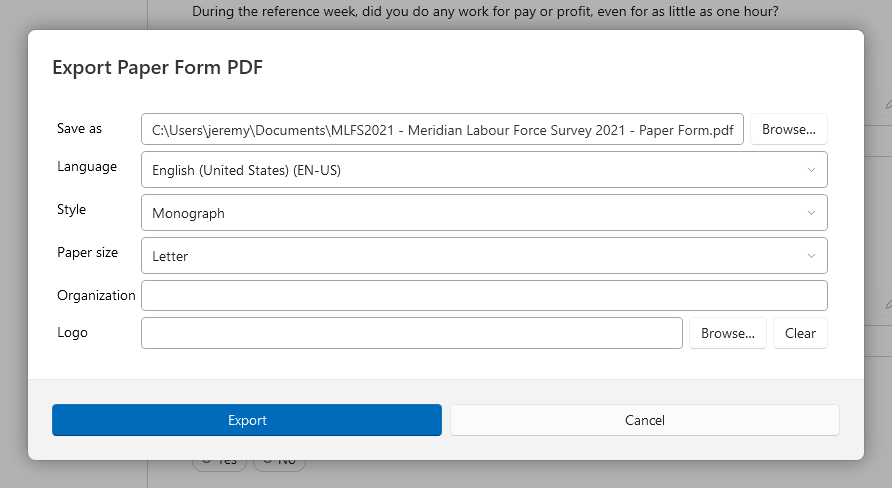
The Specification and Paper Form exports share one options dialog.
Setting |
Description |
|---|---|
Save as |
The output file, with Browse…. Its extension follows the chosen format. |
Language |
The survey language to render. |
Template |
Shown only when an installed add-in provides document templates for surveys; the built-in document is the first choice, and a template’s own options appear below it. |
Format |
PDF or HTML. Shown only when the document offers a choice, which is the Specification; the Paper Form is PDF only. |
Style |
Monograph (serif, book-like) or Registry (sans-serif). |
Paper size |
Letter or A4. Applies to the PDF. |
Organization |
A name shown in the document’s masthead; leave blank for none. |
Logo |
An image for the masthead, with Browse… and Clear. |
The dialog opens with the choices from the previous export. The format is remembered only from an export that offered one, so exporting a Paper Form does not forget that the Specification is wanted as HTML.
A single section can also be exported as a Specification, in PDF or HTML, from its section header on the canvas; question numbering stays consistent with the full survey. A section export offers the built-in document only.
DDI 3.3#
The DDI 3.3 export writes the survey as a DDI Lifecycle 3.3 fragment file. The file contains every item of the survey with its identifiers and versions, and it can be imported by other DDI tools, including Colectica Designer and Colectica Repository. See How Surveys Are Stored and Versioned for what the items and identifiers mean.
Blaise 5#
Note
This feature is available in Blaise Colectica Questionnaires.
The Blaise 5 export generates Blaise source code for the survey. It is the one export that validation can stop: when the survey has an error, or a question that produces no output, the export shows a message counting the issues and the validation rail lists them, instead of its options dialog. See Generate a Blaise 5 Survey.